My AI workflow with agents-exe
On Fri, 06 Mar 2026, by @lucasdicioccio, 1320 words, 2 code snippets, 9 links, 2images.
Unless you’ve been living under a rock, you know we’re in an age of rapid acceleration. For me, AI-based development is genuinely exciting and has made me feel more productive. As the debate rages about whether AI-assisted coding or “vibe-coding” is the future, I want to share my current “advanced experiment” with AI workflows.
I’ve been working with AI assistants for some time now. My own tool, agents-exe, is about a year old. Originally, I built it for tasks other than coding — data extraction, fixing blog typos, and experimenting with agentic topologies. But as AI models have grown more powerful (Claude-Sonnet-4.5) and affordable (Kimi-k2.5), my use of AI-assisted development has expanded significantly.
I use a variety of AI tools for development, each for different purposes, and I’ve seen them both succeed brilliantly and fail spectacularly:
- ChatGPT (web, unpaid): great for quick scripts and one-off queries that don’t require hands-on work.
- Claude Code (pro plan): my main workhorse for fixing
mypyerrors, resolving merge conflicts, handling long features, and creating vibe-coded mini-apps. - Gemini-CLI (free): perfect for infrastructure and bash scripting, plus the generous free tier is a bonus.
- agents-exe (primarily with Kimi): my go-to “flow-state” tool. Since I built it myself, it has the features I want most — and I like to think I have decent taste and vision.
I’m happy to dive deeper into why I choose each tool for specific tasks. Notably, I don’t use any IDE-integrated AI assistants; mostly because I haven’t made the time to explore that space yet.
Agents-exe in the loop
Agents-exe is a command-line tool with a terminal UI for managing multiple short LLM conversations.
What sets it apart from other tools:
- I wrote it myself before many other similar tools existed — even before MCP.
- It loads quickly.
- It features composability to run within bash pipelines, including agents calling other agents.
- Extending it with new tools is straightforward — tool descriptions follow a simple Unix-like protocol.
- It’s easy to verify that agents don’t run harmful tools. While not bulletproof (e.g., running “change code and run tests” could theoretically be exploited), current models behave nicely enough.
Illustrations
I’ve been using agents-exe more and more, evolving from artisanal to more
industrial and systematic use.
The conversational assistant
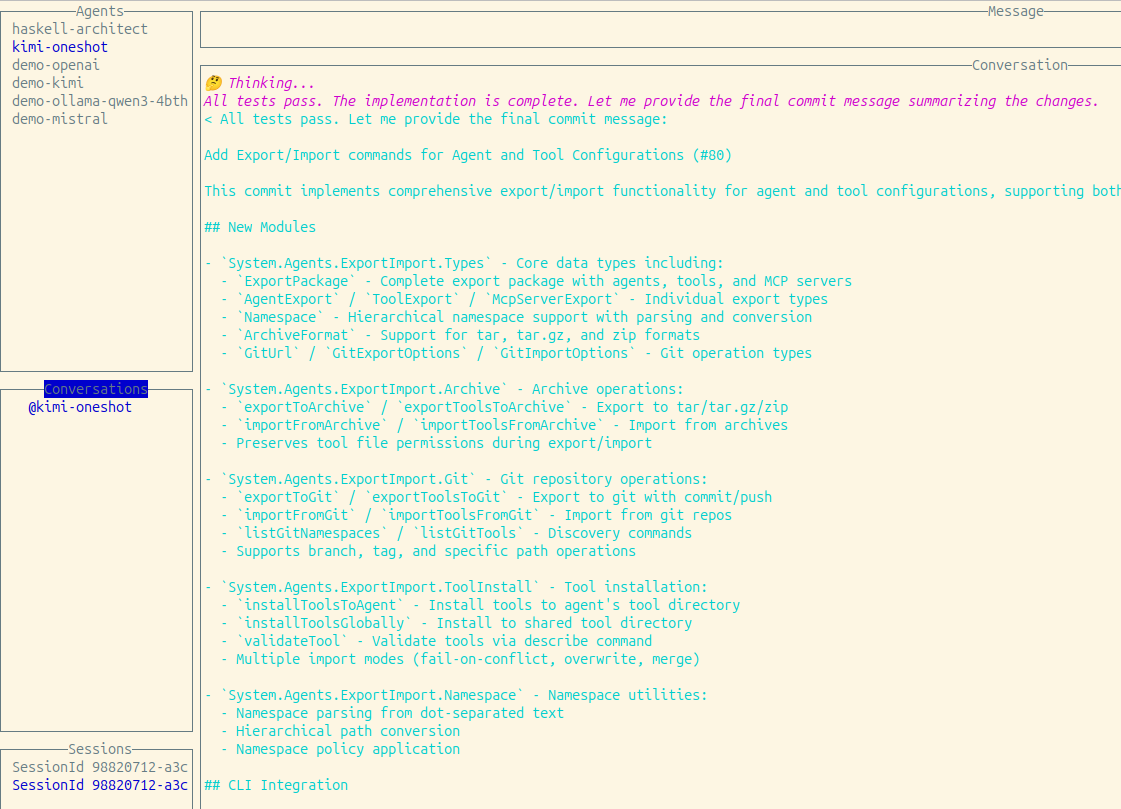
Here’s an example of the terminal UI, which I use to conduct live conversations with AI when making code changes or running operations.
I usually keep a handful of live discussions open before closing the UI and sometimes interact with multiple agents simultaneously.
The script buddy
Here’s a one-off command I made for prompt evaluation without bothering with batch APIs:
find conversations/ -name '*.txt' -exec agents-exe --agent-file agents/generate-title.json run -f '{}' \;
I write and run commands like this daily, usually without saving them, hence I don’t have many specimen to show.
The development queue
My workflow orchestrates agents-exe agents locally with a queue:
- Prepare a markdown file describing the feature or code change.
- A dequeue job:
- Creates a git worktree.
- Initializes the project environment.
- Calls agents-exe on the markdown file.
- Pretty-prints the session.
- Commits changes and creates a Pull Request.
- Jobs can be enqueued:
- Via a command opening
vimon a new task file, likegit commit. - By a crontab poller that reads GitHub Issues with specific labels:
- Labels map to specific agents (directories and commands).
- Issue content becomes the input text.
- Via a command opening
Here’s an ASCII schematic of the GitHub issue enqueuing system. The ASCII art is courtesy of an AI-generated document:
┌─────────────────┐     ┌─────────────────┐     ┌─────────────────┐
│  GitHub Issues  │────▶│  Task Files     │────▶│  Queue (sqq)    │
│  (with labels)  │     │  (.md files)    │     │  (SQLite)       │
└─────────────────┘     └─────────────────┘     └─────────────────┘
         │                                               │
         │                                               ▼
         │                                      ┌─────────────────┐
         │                                      │  Process Loop   │
         │                                      └─────────────────┘
         │                                               │
         ▼                                               ▼
┌────────────────────────────────────────────────────────────────┐
│                        WORKTREE EXECUTION                      │
│  ┌──────────────┐  ┌──────────────┐  ┌──────────────────────┐  │
│  │ Setup        │─▶│ Prepare      │─▶│ Run Agent            │  │
│  │ Worktree     │  │ Environment  │  │ (agents-exe)         │  │
│  └──────────────┘  └──────────────┘  └──────────────────────┘  │
│                                             │                  │
│  ┌──────────────┐  ┌──────────────┐         │                  │
│  │ Create PR    │◀─│ Push Branch  │◀────────┘                  │
│  └──────────────┘  └──────────────┘                            │
└────────────────────────────────────────────────────────────────┘
This system is built on conventions encoded in scripts:
- GitHub labels act as signals
- Standardized
.mdfile locations - Normalized setup and prepare environments (plus a preview command)
The local queue manager I use is sqq, originally created for photo processing.
It’s a simple, Unix-like baby-Rube-Goldberg machine — but it works well because each component runs independently. If a job fails repeatedly, I can edit the queue database with sqlite3 or enter the worktree to check logs.
Individual agents
I define an agent as “a system prompt and a set of tools.”
At Koli, I use several agents. For a monorepo with backend and frontend services, I recommend:
- A backend agent that can read/write/list/find/check Python code
- A frontend agent that can read/write/list/find/check TypeScript code
- A top-level agent that can read/find files and delegate to others
- An architect agent (also top-level) that has read-only access but can create new GitHub issues to enqueue more work
With this toolbox, I start TUI conversations with relevant agents to change code or ask the architect to help prepare neat Issues.
I can even start a new feature from my phone on Bus-62 or Metro-Line-4.
See it in action
A manual task
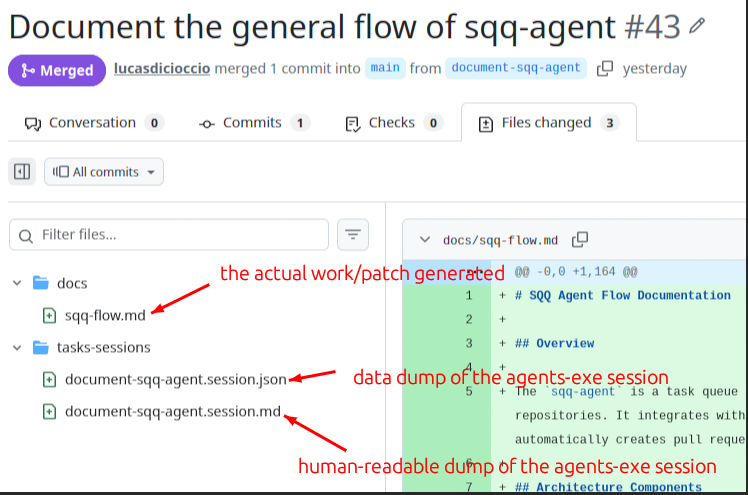
I enqueued a task by creating a .md file in vim. Once agents-exe finished work, my system auto-generated a Pull Request:
An automated architect opening multiple Issues
Here’s a feature “built on the bus,” starting from a rough idea:
- Initially, I filed an aspirational issue with few details. issue
- An architect agent picked it up and filed a more detailed related issue. issue (noted in this PR)
- I commented and re-assigned the architect, who then opened 4 new issues. (Tracked in an extra PR)
This is the current state; soon each issue will be “taken” by an agent.
Results
Disclaimer: These findings are based on my personal experience and judgment. A scientific benchmark would be interesting but is beyond my means.
Anecdotal observations
Quality: The output quality is no worse than when I managed more work myself. If anything, I now have more tests and type checks.
Highlight: Agents helped me ship features I had been procrastinating on, like tricky integrations and precise type definitions.
Highlight: They helped fix a performance bug by brute forcing two complex approaches.
Some vanity and hand-waved metrics:
- I still review ~90% of PRs.
- I manually test code in dev environments for ~75% of PRs.
- I annotate about ~50% of PRs with minor manual notes.
- These two metrics correlate: if the PR seems good (types/tests pass, critical paths unchanged), I usually just merge.
- I discard roughly 15% of agent work for inadequacy or difficulty to review.
- Over two weeks, I’ve created and iterated over 200 Issues/PRs; months ago, I reached 500 total.
- I haven’t benchmarked how many agents I can run concurrently; Amdahl’s law now applies.
Challenges
Large features passed to the architect: While breaking tasks into chunks generally works, it tends to create overly granular tasks. This granularity strains the queuing system, since all branches originate from the main trunk. Feature branches might be better.
Responding to comments: If I need to revise an automated PR, there’s no automated follow-up. Fortunately, running the queue locally means I can jump into the worktree, patch code manually, start a new agents-exe/Claude dialog, or continue the automated conversation.
What works well
Worktrees suffice: My laptop handles running tests and type checks well, though sometimes the CPU maxes out. Agents have limited access, preventing major risks, and I can easily debug.
Fast, cheap, predictable delivery: Small fixes take little time, keeping my decision framework stable. Definitions of “hard to evaluate” and “hard to enumerate” have shifted.
Simple UNIX-y tool definitions: Agents-exe predates MCP and Skills, and its straightforward UNIX design lets models output valid bash or Python scripts from few examples.
Summary
My AI-assisted development setup delivers great value, and I’ll keep evolving this lightweight Rube-Goldberg system. The pace of AI model improvements — especially with practical pricing and quality — continues to impress me.
While we haven’t entered a totally new world yet, we can glimpse future software factories evolving fast.
A key insight: trunk-based development falls short when spawning dozens of related pull requests in an afternoon. Feature branches seem better suited. I had success with an architect agent using a “big design upfront” approach that decides types early so agents can work on separate worktrees in parallel. Tackling large features requires more than clever prompts.
A final tip for my peers: over the next months, we should be like Emacs users constantly tweaking their config — but for our AI workflows.