Running PostgREST in Google Cloud-Run
On Wed, 10 Dec 2025, by @lucasdicioccio, 979 words, 6 code snippets, 5 links, 1images.
PostgREST on CloudRun offers an affordable and robust solution for a variety of data-access needs.
I’ve previously written about PostgREST use cases in web applications. Here, I’ll keep it brief: PostgREST is a service that exposes a PostgreSQL database through a standardized HTTP API with REST semantics—in a controlled manner.
At Koli, I use PostgREST as a data-exposition layer for two main scenarios. First, for creating operational dashboards and conducting one-off investigations using the Postgrest-Table tool found on this site. Second, for several administration and operations pages in our web app where PostgREST supports data searching and retrieval.
Our Setup
Koli is a young company with a simple infrastructure. For everything relevant here, PostgREST runs in the “prod mono-tenant” configuration shown below:
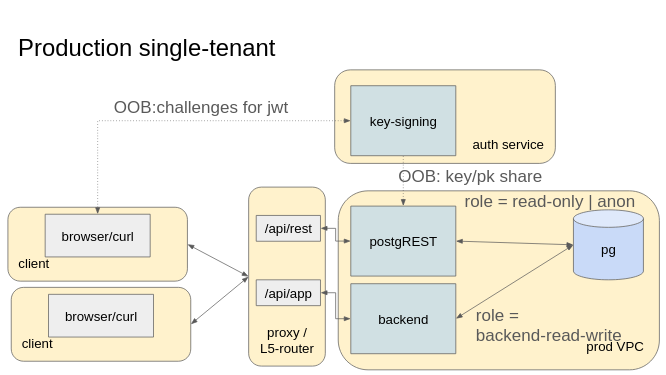
This architecture is described in more detail in a previous article.
Specifically at Koli:
- The “VPC” and L5-router run on Google Cloud
- The backend is a Python FastAPI API
- Secrets are managed via Google Secret Manager
- The key-signing application generating PostgREST-compatible tokens is part of the backend
Architecture Details
Koli’s main web application backend runs on Google CloudRun, a serverless container platform. CloudRun offers the best of container orchestration—stateless HTTP backends, automatic scaling, and restarts—without the overhead or cost of managing infrastructure. You only pay for what you use, and it can scale down to zero.
The L5-router is an external load balancer with a URL map that routes HTTP requests either to the FastAPI backend or to PostgREST. Our authentication service is a token-signing endpoint in the backend that generates JWT tokens signed with a shared key stored in Google Secret Manager. The backend configures JWT claims based on application-specific rules, ensuring PostgREST’s user permissions depend on the main user’s rights. Finally, PostgREST itself runs inside CloudRun, giving us the flexibility and scalability discussed here.
Configuration
PostgREST is stateless and very efficient. In practice, it rarely becomes a bottleneck, unlike other parts of the system. The main challenge with PostgREST is configuring your database roles and grants properly—a topic well-covered in PostgREST’s official documentation. Once your roles and grants are set, the next step is securely connecting PostgREST to the database from within CloudRun.
Connecting to the Database
I configure Postgres to authenticate users using client certificates rather than passwords. This enforces encrypted connections (sslmode=verify-ca) by design.
In this setup, we use:
- A host (CA) certificate to verify the database identity, called
rootcert - A client certificate and private key to prove the client’s identity to the database
PostgREST uses libpq to connect to Postgres, so we configure it with a connection string that points to the required certificates. PostgREST also needs to know the anonymous role and JWT verification key, which you can provide either via environment variables or a configuration file. However, libpq reads certificates and keys from disk, so mounting secret files correctly is critical.
Here’s my environment setup:
- CLOUDRUN=true  # to differentiate running in CloudRun vs locally
- PGRST_DB_ANON_ROLE=my_postgrest_anonymous_role
- PGRST_JWT_ROLE_CLAIM_KEY=.my.jwt-claims.postgrest-role
- PGRST_DB_URI=host=my.database.host.example port=5432 dbname=my_database user=my_postgrest_authenticator_role sslmode=verify-ca sslcert=/opt/secrets/postgrest-cert.pem/value sslkey=/opt/secrets/postgrest-key.pem/value sslrootcert=/opt/secrets/rootcert.pem/value
And secret mounting looks like this:
- PGRST_JWT_SECRET=postgrest_shared_jwt_signingkey:latest
- /opt/vault/postgrest-cert.pem/value=api_db_api_postrest_cert:latest
- /opt/vault/postgrest-key.pem/value=api_db_api_postrest_key:latest
- /opt/vault/rootcert.pem/value=shared_db_root-ca_cert:latest
Note the different file paths between the connection string and secret mounts. This is intentional. libpq enforces strict filesystem ACL checks on certificates (which fail on Google CloudRun’s volume mounts because you can’t modify the ACLs or chmod secret files). To work around this incompatibility, I created a custom container image with a run.sh entrypoint script that copies secrets to a new directory and sets restrictive permissions before starting PostgREST.
Building and Running the Container Image
PostgREST is available as a Docker container. We repackage it with a custom entrypoint to fix the ACL issue.
Here is the run.sh script:
#!/bin/bash

set -x

if [ -n "${CLOUDRUN}" ]; then
  cp -rv /opt/vault /opt/secrets
  chown -R "$(whoami)" /opt/secrets
fi

find /opt/secrets -name 'value' -exec sha256sum '{}' \;
find /opt/secrets -name 'value' -exec chmod 0600 '{}' \;

/bin/postgrest
The sha256sum commands aid debugging secret typos. The key steps are the chown and chmod commands that make libpq happy.
My Containerfile builds the image in two stages, tagging it as postgrest:v12.2.1-cloudrun:
FROM postgrest:v12.2.1

FROM python:3.12-alpine

WORKDIR /usr/src/app

RUN apk add --no-cache sha256sum bash findutils postgresql-libs

COPY run.sh .
COPY --from=0 /bin/postgrest /bin/postgrest

EXPOSE 3000

CMD ["bash", "run.sh"]
(Note: I realized I started from python:3.12-alpine unintentionally; I plan to revisit the base image choice and update this post accordingly.)
After building and pushing this image to my Artifact Registry, I configure a CloudRun service for PostgREST.
Example CloudRun spec snippet:
spec:
  containerConcurrency: 80
  timeoutSeconds: 300
  serviceAccountName: xxxxxxxxxxxx
  containers:
  - name: postgrest-1
    image: us-west1-docker.pkg.dev/xxxx-123456/xxxx-repo/postgrest:v12.2.1-cloudrun
    ports:
    - name: http1
      containerPort: 3000
    env:
    - name: PGRST_DB_ANON_ROLE
      value: my_api_postgrest_ro
    - name: PGRST_JWT_ROLE_CLAIM_KEY
      value: .mypostgrestinfo.mypostgrestrole
    - name: PGRST_DB_URI
      value: host=postgres-1234.example.com port=5432 dbname=mydatabase user=my_api_postgrest_authenticator sslmode=verify-ca sslcert=/opt/secrets/postgrest-cert.pem/value sslkey=/opt/secrets/postgrest-key.pem/value sslrootcert=/opt/secrets/rootcert.pem/value
    - name: PGRST_JWT_SECRET
      valueFrom:
        secretKeyRef:
          key: latest
          name: postgrest_jwt_signing_key
    resources:
      limits:
        cpu: 1000m
        memory: 256Mi
    volumeMounts:
    - name: postgrest_cert-gag-wuw-pon
      mountPath: /opt/vault/postgrest-cert.pem
    - name: postgrest_key-loq-poz-yiz
      mountPath: /opt/vault/postgrest-key.pem
    - name: pg_rootcert-ca_cert-nix-mij-poh
      mountPath: /opt/vault/rootcert.pem
This configuration defines:
- the container image and its registry
- environment variables specifying PostgREST roles and JWT claim keys
- the Postgres connection string with certificates
- secret volume mounts
- JWT shared signing key injected via a secret environment variable
The run.sh script then copies these secrets to /opt/secrets with strict permissions for libpq.
JWT Signature Verification
I use a shared JWT secret to verify tokens. While asymmetric keys offer stronger security, they add complexity my setup doesn’t require. The backend FastAPI app exposes a token-signing endpoint that creates short-lived JWTs to allow clients to query PostgREST. This part uses the Python jwt library.
Using PostgREST in Frontend Code
The frontend, mostly React with JSX and CSS, has some hand-crafted API calls.
For example, for a fictional SQL view view_emails_1234 exposed via PostgREST, the code looks like:
const postgrestApiBaseUrl = "https://.../api/postgrest-data/";

export interface GetEmailsArgs {
  pageSize: number;
  page: number;
  fromFilter?: string;
  toFilter?: string;
  subjectFilter?: string;
}

export const getEmails =
  ({ postgrest_token }: AuthState, args: GetEmailsArgs) =>
  async () => {
    const { page, pageSize, fromFilter, toFilter, subjectFilter } = args;
    if (!postgrest_token) {
      throw new Error("Auth is missing");
    }
    const baseUrl = `${postgrestApiBaseUrl}/view_emails_1234`;
    const queryparams = new URLSearchParams({
      order: "created_at.desc",
      limit: `${pageSize}`,
      offset: `${page * pageSize}`,
    });
    if (fromFilter) queryparams.set("from_str", fromFilter);
    if (toFilter) queryparams.set("to_str", toFilter);
    if (subjectFilter) queryparams.set("subject", subjectFilter);
    const url = `${baseUrl}?${queryparams.toString()}`;
    const rsp = await fetch(url, {
      headers: {
        Authorization: `Bearer ${postgrest_token}`,
      },
    });
    if (!rsp.ok) {
      throw new Error("Error fetching emails");
    }
    return rsp.json();
  };
Quick tips:
- Expose PostgreSQL views to abstract filtering logic (e.g., to hide old or soft-deleted rows)
- Always paginate results using
limitandoffset - Hardcode ordering in the API but optionally allow client-side tuning
- Expose filters in your API that map directly to PostgREST’s horizontal filtering syntax
- Use
selectqueries to limit returned columns or embed related data as needed
From an architectural perspective, I use PostgREST endpoints in three ways:
- Data search endpoints returning small digests (e.g., primary keys and titles)
- Data lookup endpoints fetching many columns based on primary keys
- Combined search + lookup endpoints when data sizes are manageable
Scaling and Cost
I run PostgREST-Table with 1 CPU and 256 MB RAM the next to the smallest commitment you can make on CloudRun, and likely less powerful than your phone.
Though I haven’t run formal benchmarks, PostgREST on CloudRun feels very fast. Initial connection setup takes less than a second, with subsequent queries responding almost instantly. In many cases, it outperforms my Python/FastAPI backend at serving data.
Since Koli is still small and PostgREST is used only in administration/operation pages, the cost is negligible (less than a coffee per month). The primary cost driver is network traffic, since dashboards tend to request more data than ultimately displayed.
What’s Next?
Some details were glossed over, notably database migration. The main challenge is aligning roles, grants, certificates, and PostgREST JWT claims across deployments. This is less exciting since Koli is single-tenant, but I do have my own provisioning and migration tools.